Ting
macOS 14+ · Apple silicon and IntelYour next app. A few keys away.
A leader-key launcher for macOS. Press your leader key, then a key or short sequence to open an app or URL, or to start a small micro-app. Home, then w, g — and you’re on GitHub. Double-tap the leader to search apps with launcha.
Signed with Developer ID and notarized by Apple.
Currently distributed through GitHub Releases.
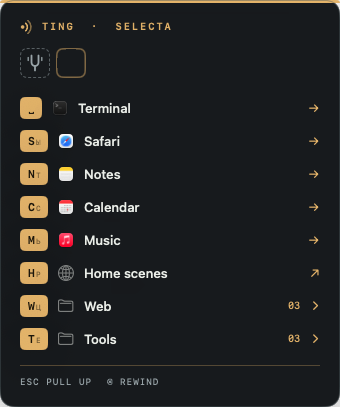
Press the leader, then one key. 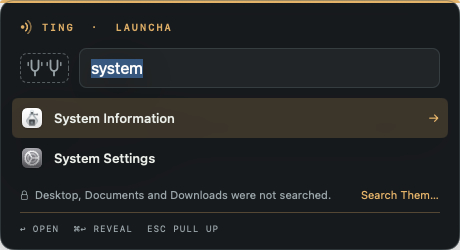
Double-tap the leader to search apps. 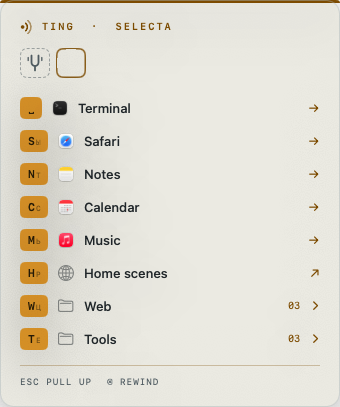
Light or dark, as you like. 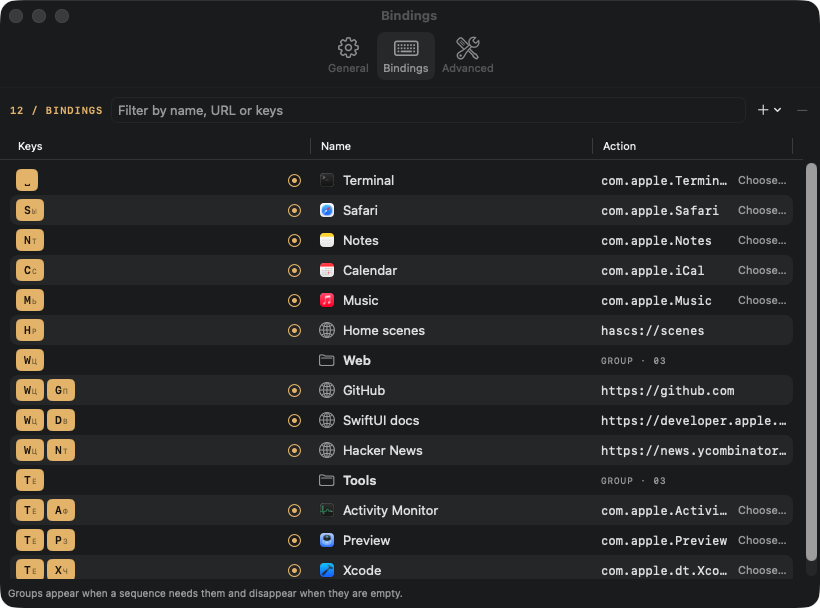
Every sequence in one table.
Ting 0.5.0: steps and libraries
A micro-app can now be a list of steps: shell or Python code, HTTP requests, AI calls (OpenAI, Anthropic or a local server such as Ollama), text, JSON fields, opening a URL and notifications, piped one into the next. Shared steps live once in libraries. The ting-micro console tool checks and runs micro-apps, and a coding agent can now add your bindings too.
Ting 0.4.0: micro-apps
A micro-app is one YAML file that runs one shell command: it can ask for a few parameters, read the clipboard and show or copy the result. Bind a key to it or start it from launcha. Ting runs it only after you approve the exact file. Copy Agent Prompt hands Claude Code, Codex or pi what they need to write one, and Ting --check checks the file.
Ting 0.3.3: a quieter “ting”
The sound Ting plays when it opens an app, link or file is now half as loud. Turn it off in Settings → General with Play a “ting” when opening an app, link or file.
Ting 0.3.2: complete app list
launcha now scans every app in its folders, however large or deeply nested, and no longer shows scan-limit notices.
Ting 0.3.1: closer selecta spacing
With the panel title hidden, the leader-key row now sits closer to the amber top rule, matching launcha.
New in 0.3.0: launcha
Double-tap the leader to search apps, or set a separate hotkey. Results rank by successful Ting launches over the last seven days. When no app matches, Spotlight searches indexed files in your home folder, subject to folder consent. Use Check for Updates… in Ting to upgrade.
One key to begin
Choose any non-modifier key, alone or with modifiers: Home, F13, or Option-Shift-Command-F. A modifier alone cannot be the leader. There is no default: Ting asks you on first launch.
A small menu, when you need it
Organize nested groups such as Apps and Web. Use letters, digits, Space, Return, and F-keys. Esc closes the menu; Delete goes back a level. Type quickly and the menu stays out of the way: its delay defaults to 0.25 s.
Keep your keyboard layout
Bindings use the Latin letter of each key and work with any layout, including Russian and Ukrainian. The menu shows the current layout’s letter as a small hint beside it.
Your bindings, your file
Edit ~/.config/ting/config.json by hand, keep it in dotfiles, or use Settings. Ting reloads changes automatically. Apps open or come to the front; URLs open in the default app, including schemes such as raycast://.
Quick start
A little setup. Back to your day.
macOS 14+ · Apple silicon and Intel. Universal ZIP for Apple Silicon and Intel, with a SHA-256 checksum file. Menu-bar only, with no Dock icon. The interface is English only.
View the latest release ↗01Download and install
Download the latest release ZIP from GitHub, unzip it, and move Ting.app to /Applications. Releases are signed with Developer ID and notarized by Apple.
02Choose your leader
Open Ting and press the key you want to use as your leader. No Accessibility or Input Monitoring permission is needed: Ting uses the standard macOS hotkey API.
03Make it yours
In Settings → Bindings, record key sequences and finish with Done. Missing groups are created and empty groups removed automatically. You can also edit ~/.config/ting/config.json directly.
Good to know
Do I need special permissions?
No Accessibility or Input Monitoring access is needed. launcha skips Desktop, Documents and Downloads until you explicitly allow access; macOS may then request folder permissions.
Can I run shell commands?
Yes, from micro-apps since 0.4.0: YAML files in ~/.config/ting/micro/. Ting runs a command only after you approve the exact file content, as your user with your full rights, for 60 seconds by default and at most 300. Since 0.5.0 a micro-app can also run Python, HTTP requests and AI calls as steps. App and URL bindings run no commands; config.json holds no code.
Does it work with Russian and Ukrainian layouts?
Yes. Bindings are stored by Latin key letter, with a small current-layout hint in the menu. You don’t need to switch layouts.
How is it different from Spotlight?
selecta opens your fixed sequences without search; fast sequences skip the menu. launcha adds app-name search, ranked by use through Ting. Spotlight file search is a fallback only when no app matches.
Is it in the App Store?
No. Download the universal ZIP from GitHub Releases. Built-in Sparkle updates use the public GitHub release feed.
Why Ting?
“Ting” means “thing” in Jamaican patois and London slang. Amber keycaps, a graphite panel, and “pull up” / “rewind” hints give the menu a light nod to grime and sound-system culture.