
Splash Finish
macOS 14+ · Apple silicon and IntelYour agents work. You stay focused.
One quiet inbox for Claude Code, Codex, and pi. Know when work is done or an agent needs a decision, then return to the right session.
Signed with Developer ID and notarized by Apple.
Currently distributed through GitHub Releases.
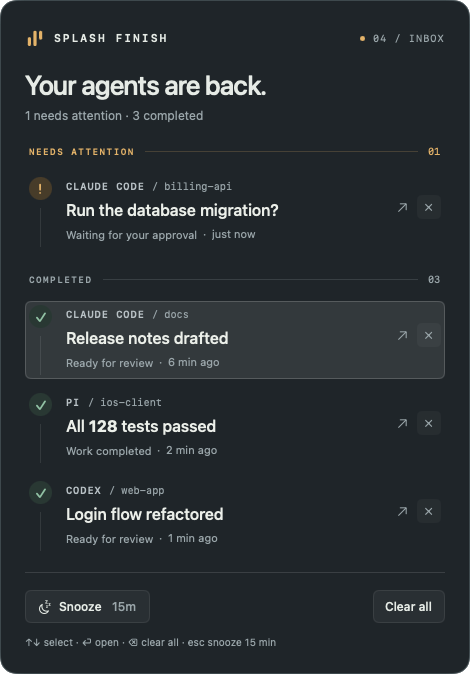
Every agent in one inbox. 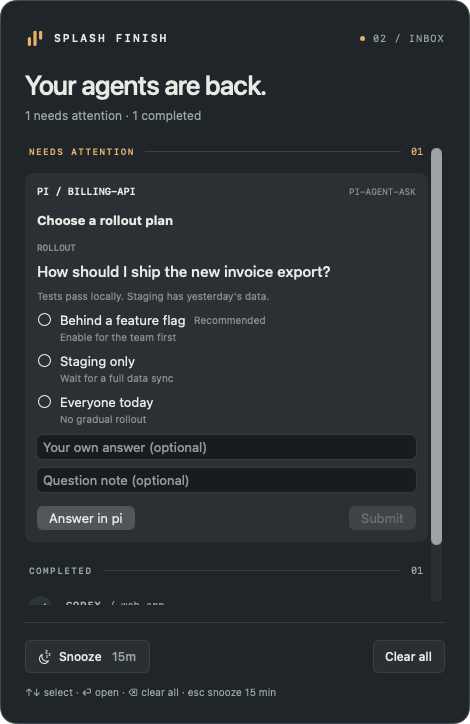
Answer pi right in the inbox. 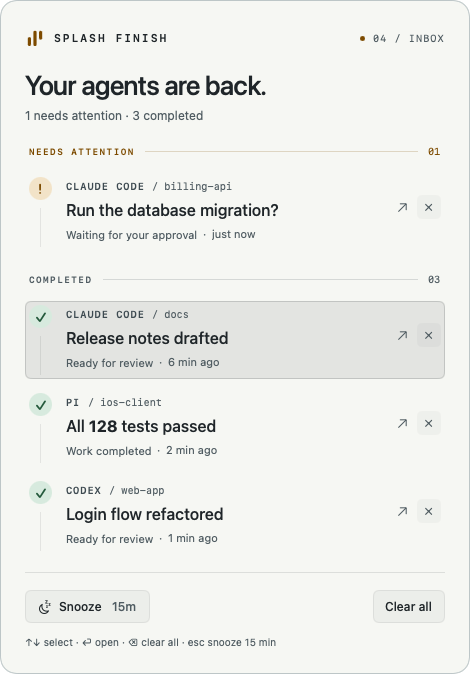
Light theme, if you prefer.
One place for everything
Completed tasks and requests for attention from Claude Code, Codex, and pi share one window.
Back to the context
Click a notification to return to its source. Rex support returns to the original local session and pane. Exact navigation depends on your terminal and integration.
At your own pace
Snooze notifications, respect Do Not Disturb, pick a light or dark theme, or open the inbox with ⌥⌘S.
Local by default
No app account or analytics. The inbox stays on your Mac; updates come from GitHub.
Quick start
A little setup. Back to your day.
macOS 14+ · Apple silicon and Intel. The installer requires Python 3.10+.
View the latest release ↗01Install the app
Run this in Terminal. The installer checks SHA-256 and the Developer ID signature, then installs the app in ~/Applications.
curl -fsSL https://raw.githubusercontent.com/bobuk-io/splash-finish/main/install.py | python3 -This command downloads and runs a script. Read it before running ↗
02Connect your agents
In Claude Code, start a new session. In Codex, review and trust hooks via /hooks. In pi, run /reload.
splash-finish install-skillsGood to know
What’s new in 0.3.12?
Return to the original local Rex session and pane from notifications and rich pi questions. Enable Remote Control in Rex and keep one local Mac app client connected. After updating, run splash-finish install-skills, then /reload in existing pi sessions to refresh the question adapter. Older notifications without Rex coordinates cannot recover their original pane.
What’s new in 0.3.11?
Less noise from temporary Codex sessions used for tab titles and suggestions: hook events with an explicitly null or empty transcript path no longer change the inbox. Normal sessions remain supported, and JSON answers are not filtered by their text.
What’s new in 0.3.9?
A light theme. Open Settings… (⌘,) from the menu bar icon and choose Light or Dark; the panel stays dark until you switch. Start at Login, Respect Do Not Disturb, and installing or removing agent skills now live in Settings too.
What changed in 0.3.8?
Less noise from pi: browsing idle menus such as /jewter no longer opens Splash Finish or clears completed items. Questions and approvals during an agent run still notify you. Managed workers can opt out with SPLASH_FINISH_DISABLED=1.
Is this an App Store app?
Not yet. A signed and notarized version is available through GitHub Releases. An App Store link will appear after publication.
Do I need all three agents?
No. Install just one integration: splash-finish install-skills --agent pi. Replace pi with claude or codex as needed.
How do I update or uninstall?
Use Check for Updates in the app menu or run the installer again. After updating to 0.3.8, run splash-finish install-skills to refresh integrations, then /reload in existing pi sessions. To uninstall, first run splash-finish uninstall-skills, quit the app, and remove it from ~/Applications. See Support for data removal details.